
A Covidence systematic review, a Rayyan systematic review, and an Elicit search get compared as if they were one kind of work. The first two are the same job done in two review platforms. An Elicit search runs in an AI discovery assistant, built to find and summarize papers. Reference managers, such as EndNote and Zotero, form a third class.
Feature lists hide the difference. Screening, extraction, and AI appear on the feature pages of platforms and discovery assistants alike, and the words mean different things in each. Two facts about your project separate the classes faster than any list: what kind of review you are running, and who is on the team.
This guide sorts review tools into three classes and maps each one against eight workflow stages, from database import to collaboration. Its decision tree turns four questions about your review and your team into a class of tools. It also says where a free tier is enough, because for some teams it is.
Three classes of tool, and where Covidence systematic review software sits
Review platforms. Covidence, Rayyan, and DistillerSR belong here. The Cochrane Handbook names Covidence and EPPI-Reviewer as Cochrane-preferred tools, likely to integrate best with RevMan. A platform is organized around the review record: citations, duplicates, independent screening decisions, conflicts, and exclusion reasons. Extraction forms, risk-of-bias assessment, and the PRISMA counts sit in the same place. Rayyan’s published feature list covers each of those stages, from import to PRISMA reporting. The unit of work is a decision made by a named reviewer against a protocol.
AI discovery assistants. Elicit and Consensus belong here. They search their own index of papers, rank and summarize the results, and pull answers out of full texts. As of September 2026, Elicit states that it searches over 138 million academic papers and 545,000 clinical trials. Consensus describes itself as “an AI academic search engine for peer-reviewed literature”. Its literature-review page offers search, screening, and extraction, and pitches the tool for scoping reviews and rapid evidence checks before deeper screening. The unit of work is an answer to a question.
Reference managers. EndNote and Zotero belong here. They import records in RIS or BibTeX, store PDFs, match duplicates on author, year, and title, and format citations for a manuscript. The unit of work is a reference.
Every review team needs a reference manager, because the manuscript still needs citations. The real choice sits between the other two classes. For a review headed for publication, it usually narrows to platforms.
The position map adds the two ends of the range. Spreadsheet and email sit at the bottom: anyone can start, and nothing is logged. A managed service sits at the top, with methodologists on the review team and the most onboarding. In between, depth and ease of entry trade against each other.
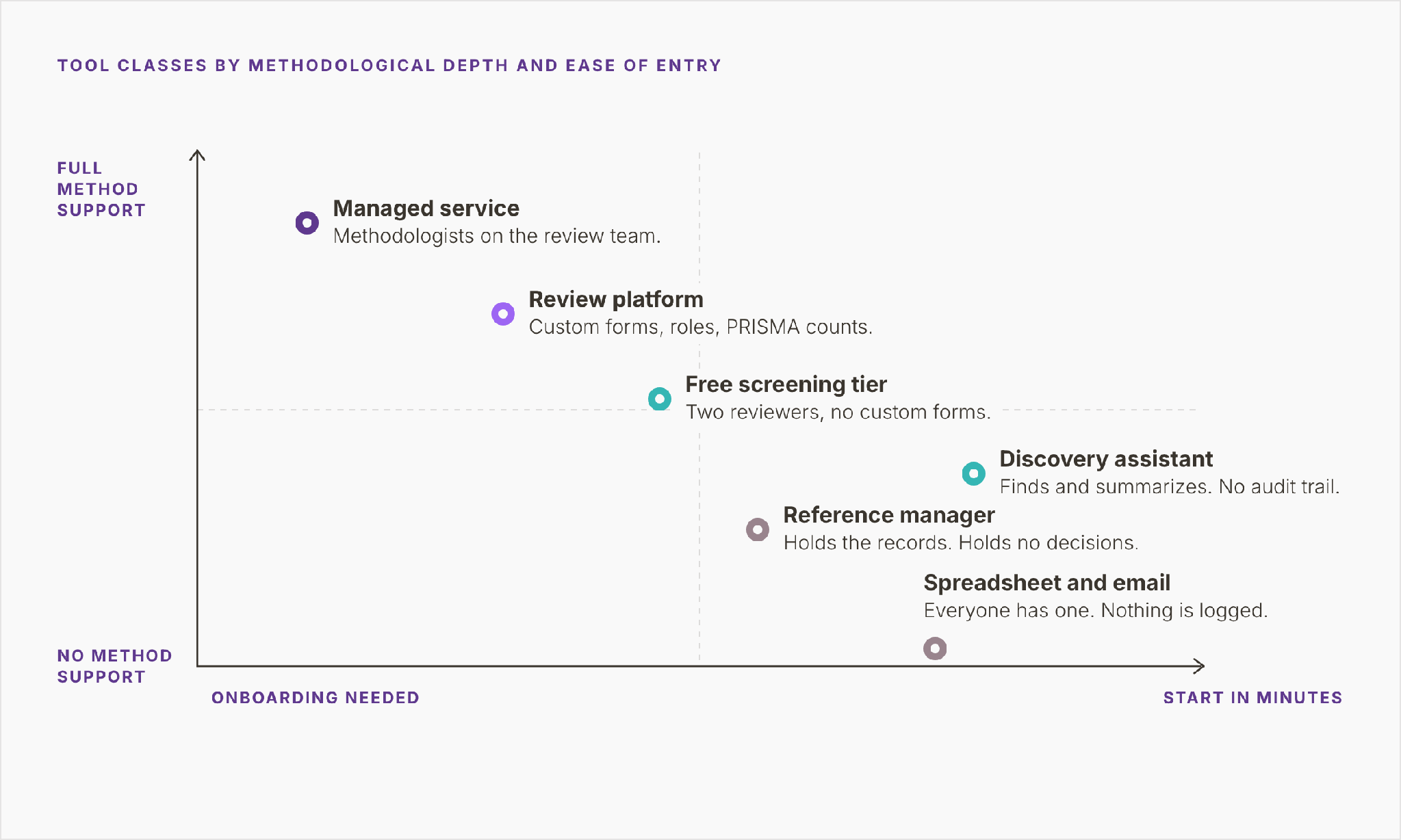
Figure 1. Six ways of running review work, from spreadsheet and email to a managed service, plotted by how much of the method each supports and how fast a team can start.
Why comparing an Elicit search with Covidence is a category error
Elicit for literature review work and Covidence for a systematic review answer different questions. An Elicit search asks what the literature says about a topic. A systematic review asks which studies meet criteria fixed in a protocol, and it has to show the decision behind every record it rejected.
That second requirement decides the class. The Cochrane Handbook (version 6.5.1, chapter 4) makes it mandatory that at least two people, working independently, decide whether each study meets the eligibility criteria. It also requires the selection process to be documented well enough to build a flow diagram and a table of excluded studies. A ranked answer from a tool’s own index produces neither record.
The boundary between classes is moving. Elicit now also runs a separate Systematic Review workflow. By its own account it supports PRISMA 2020, dual screening with an exclusion reason for every decision, which puts that workflow in the platform class. Judge it as you would any platform: by what it logs. The log should show who screened each record, whether screeners were blind to each other, and why each exclusion happened. The same test applies to any Elicit alternative for a systematic review.
Discovery assistants still earn a place early on: scoping a question, checking whether a review already exists, and finding seed papers for the search strategy.
Eight workflow stages, three classes of tool
The matrix sets eight workflow stages against the three classes. Each cell says what the class does at that stage. A tick would hide the point: a reference manager and a platform both remove duplicates, and they leave different records behind. The discovery-assistant column describes search mode. Elicit’s Systematic Review workflow imports and deduplicates records, and belongs in the platform column.
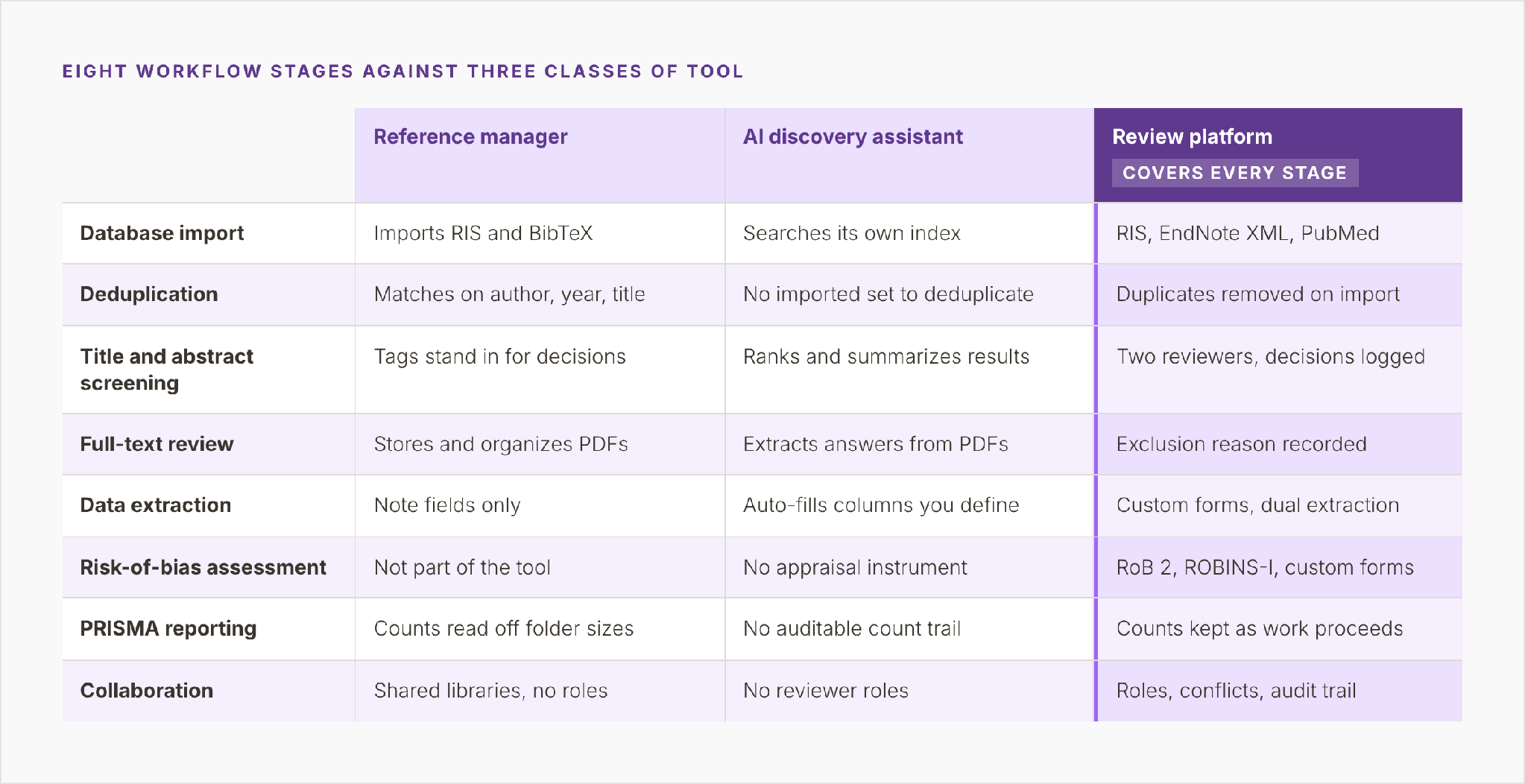
Figure 2. What a reference manager, an AI discovery assistant, and a review platform each do at eight stages, from database import to collaboration.
Import and deduplication
A reference manager imports RIS and BibTeX files and matches duplicates on author, year, and title. That is enough for a bibliography. In a review, the matches need checking, because a record wrongly deleted as a duplicate leaves the flow diagram without a trace.
In search mode, a discovery assistant queries its own index, so there is no imported set to deduplicate. That is convenient and methodologically awkward. The search belongs to the tool, and the review cannot report the databases, strings, and dates that PRISMA 2020 asks for.
A review platform takes RIS, EndNote XML, and PubMed exports from the databases your information specialist searched and removes duplicates on import. The number removed becomes the duplicates line in the PRISMA box for records removed before screening.
Screening and full-text review
At title and abstract screening, a reference manager offers tags or groups, and the tags stand in for decisions. Two reviewers tagging one shared library see each other’s work, so independence ends at the first click. A discovery assistant ranks and summarizes results, which helps a reader and records no decision.
A review platform gives each reviewer a separate queue, logs every decision against the person who made it, and flags conflicts. PRISMA 2020, item 8, asks the report to state how many reviewers screened each record, whether they worked independently, and which automation tools were used. In a platform the first two can be read off the decision log.
At full-text, the Cochrane Handbook treats dual independent assessment as essential, though it accepts a single screener for titles and abstracts. A reference manager stores and organizes the PDFs. A discovery assistant extracts answers from them. A platform records an exclusion reason for every report it rejects, and the PRISMA breakdown of full-text exclusions is built from those reasons.
Extraction and risk of bias
Extraction is where the classes diverge most. A reference manager offers note fields, which fill with free text nobody can pool. A discovery assistant auto-fills columns you define across a set of papers: a fast first pass whose values still need checking against the source.
A review platform provides custom forms and dual extraction. Chapter 5 of the Cochrane Handbook makes a piloted data collection form mandatory. It also requires at least two people, working independently, to extract outcome data. A platform that stores both extractions side-by-side turns the comparison into a routine step.
Risk-of-bias assessment belongs to one class only. A reference manager has no part in it, and a discovery assistant has no appraisal instrument. A review platform carries structured tools such as RoB 2 for randomized trials and ROBINS-I for non-randomized studies of interventions. Some platforms also let a methodologist build a custom form when a study design needs one.
PRISMA reporting and collaboration
The PRISMA flow diagram is arithmetic, and each class keeps the arithmetic differently. With a reference manager, the counts are read off folder sizes at the end, and a record moved between folders twice leaves no history. A discovery assistant keeps no auditable count trail. A platform keeps the counts as the work proceeds. Records identified minus records removed before screening equals records screened, with no one adding it up by hand. The removals cover duplicates, records marked ineligible by automation tools, and records removed for other reasons.
Collaboration follows the same pattern. A shared library lets a team see the same records with no roles attached. A discovery assistant’s search has no reviewer roles. A platform assigns roles, routes conflicts to an adjudicator, and keeps an audit trail of who changed what. On a two-person review, that trail is a convenience. On a review with six screeners and a journal waiting, it is how you answer an editor’s question about one excluded record.
Screening in EndNote and spreadsheets
A common starting point for a first review is EndNote plus a spreadsheet. Export the library, paste the titles into rows, add a column per reviewer, and screen. It is familiar and costs nothing extra. The Cochrane Handbook cites a published method for screening in EndNote, by Bramer and colleagues (2017), for teams without specialist software.
The method strains as volume grows, and a broad clinical question can return thousands of records after deduplication. The failures arrive in predictable places.
Independence. Two reviewers in one shared sheet see each other’s decisions. Two separate sheets keep them blind and create a merge job at the end.
Versions. Somebody sorts a column, somebody else pastes in a new export, and Friday’s file stops matching the one both reviewers screened on Tuesday.
Reasons. A free-text exclusion column collects “wrong pop”, “wrong population” and “adults only” for the same criterion, and PRISMA needs them counted by category.
Counts. The flow diagram gets assembled at the end from filter counts, long after anyone remembers which filter was applied when.
Full texts. The PDFs sit in one reviewer’s folder, and the second reviewer’s annotated copies sit somewhere else.
The Cochrane Handbook accepts decisions tracked in a spreadsheet, provided the tracking is complete enough to build the flow diagram and the excluded-studies table. On a small review, a spreadsheet can meet that bar. On a large one, meeting it becomes someone’s job.
What AI features change in a review tool
Platforms and discovery assistants both advertise AI now, and the word covers different things. In a discovery assistant, AI is the product: search, ranking, summaries, and extraction. In a review platform, AI sits inside a human workflow. Rayyan markets features under the name ResearchPilot: zero-shot relevance ratings, an AI Analyzer, an AI Reviewer, and automated data extraction. Elicit’s Systematic Review workflow lets its AI support two human screeners or act as the second reviewer.
The Cochrane Handbook summarizes the evidence on screening automation, citing O’Mara-Eves and colleagues (2015). In the Handbook’s summary, automation can cut manual screening by at least 30 percent and possibly more than 90 percent. The cost is sometimes a loss of up to five percent in sensitivity.
A reordered queue changes when you find the eligible studies. A stopping rule changes how many records a human reads, and the recall given up has to be justified in the methods section.
Items 8 and 9 of PRISMA 2020 ask the report to give details of any automation tools used in selecting studies and collecting data. Whatever tool you choose, keep a human decision behind every inclusion and every exclusion reason, and record which AI features were switched on. A feature you cannot describe in a methods section should remain switched off.
Which tool for which team
Four questions narrow the choice to a class of tool. They come in order, and a no at any of them exits the tree at a different class. Which product to pick within the class is a smaller decision, best made on a trial with your own records.
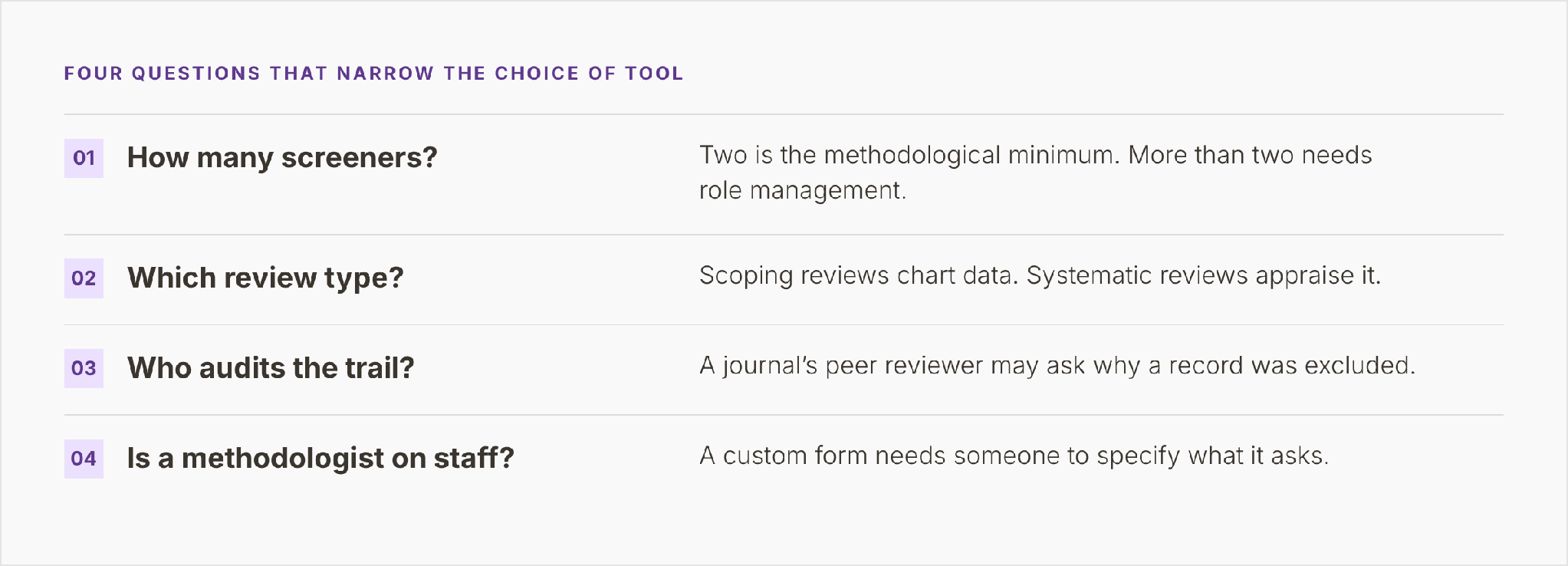
Figure 3. How many screeners, which review type, who audits the trail, and whether a methodologist is on staff, in the order that narrows the choice.
How many people screen
Two is the methodological minimum for inclusion decisions. A two-person team can screen without role management: each reviewer works through the queue, and conflicts get settled by discussion. A free screening tier covers that. A third screener or a separate adjudicator needs roles. Someone assigns records, tracks who has screened what, and routes each conflict to the person entitled to resolve it.
Scoping review or systematic review
Scoping reviews chart data. Systematic reviews appraise it. PRISMA-ScR, the reporting extension for scoping reviews, asks authors to report critical appraisal only if they carried one out. Using Covidence or Rayyan for a scoping review comes down mostly to the extraction form. Screening runs the same way. Extraction becomes charting, with fields built around population, concept, and context. A scoping review needs screening plus charting, and the tree sends it there.
Who audits the trail
A review headed for a journal meets a peer reviewer who may ask why a record was excluded. A review headed for a guideline panel, an HTA body, or a regulator meets a closer audit. Where no one outside the team will check, a shared screening workspace with a decision log is enough. Where someone will, the trail has to show who decided, when, on which criterion, and how each conflict was resolved.
Whether a methodologist is on the team
A custom form needs someone to specify what it asks. An extraction form built for meta-analysis needs a statistician’s list of fields. A risk-of-bias form for an unusual design needs someone who knows which domains matter. A team with a methodologist on staff can take a full review platform and configure it. A team without one can bring the expertise in, or choose a platform with methodological work inside the contract.
Answer yes at all four forks and the tree ends at a full review platform. That means custom forms, dual review, roles, and an audit trail in one workspace.
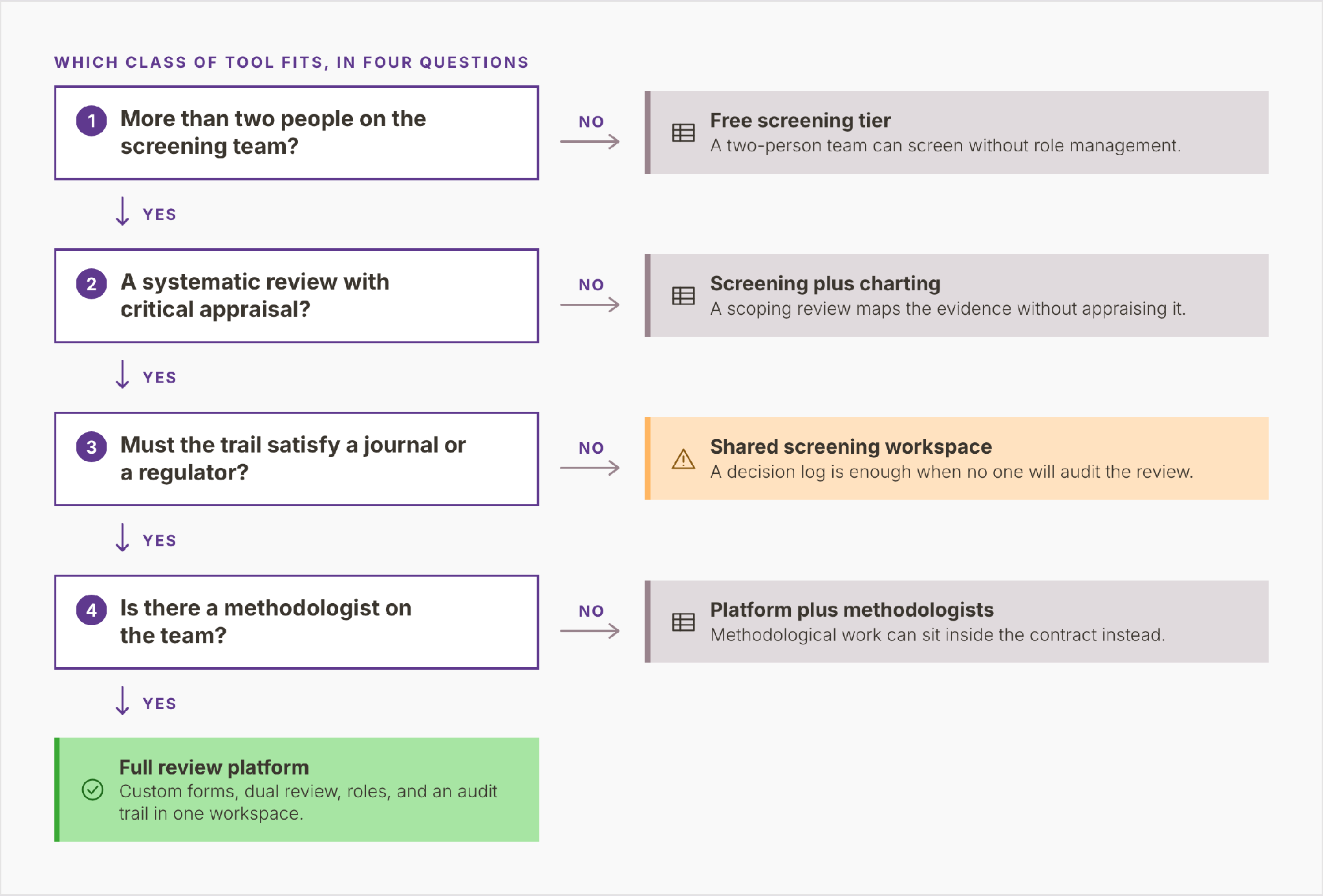
Figure 4. A decision tree of four yes-or-no forks, where each no exits to its own class of tool and four yeses end at a full review platform.
When the free tier is enough
For a two-person team that needs screening and nothing else, a free tier is enough, and paying for more buys nothing the review will use. As of September 2026, Rayyan’s pricing page lists a free plan at $0 with no end date. It allows three active reviews and lets the owner invite two reviewers. Paid tiers are priced per seat or per license and raise those limits.
That fits a specific setup: two reviewers, a scoping review or a small systematic review, and extraction in a spreadsheet built from a piloted form. If you are looking for a Covidence free alternative for a two-person screening project, a free screening tier with disciplined record-keeping serves you well.
The free tier stops being enough at identifiable points. The team outgrows the tier’s reviewer limit, or needs an adjudicator with a defined role. The protocol calls for dual extraction on a custom form, and two spreadsheets need reconciling. The study designs need a risk-of-bias instrument, and the appraisal ends up in a document nobody can query. A journal or an HTA body asks for the trail. Each of these is a methodological reason to move up a class.
Moving mid-review has a cost. Decisions made in one tool must reach the next with their reviewers and reasons intact. Before committing a growing review to a free tier, check its exports. They should carry decisions by reviewer, exclusion reasons, and conflict history.
Custom forms, flexible review, and methodologists in one contract
PICO Portal, which publishes this blog, is a review platform built for teams further down the decision tree. Those teams have several screeners, an appraisal step, and a trail someone will audit, and may lack in-house methodological expertise. It offers those teams three things:
Custom risk-of-bias and extraction forms. Teams can use pre-built risk-of-bias tools or build their own, and design extraction forms around the fields their synthesis needs. That matters when the study designs do not fit a standard instrument, or when a statistician needs specific fields captured before pooling.
Single and dual review. Teams can set single or dual review for each stage to match the protocol. A protocol can call for one screener on titles and abstracts and two at full-text. A Judicator role, the platform’s name for the adjudicator, resolves conflicts.
Methodologists in the same contract. Through the PLUS+ service, trained methodologists join client projects for search strategy, screening, full-text review, extraction, and risk-of-bias assessment. That answers the last fork of the tree, a team without a methodologist.
A review already under way elsewhere can move across without restarting. Records are uploaded in included, excluded, and undecided sets, and their status is re-entered at abstract screening. Keep the original tool’s export, because reviewer-level decisions and conflict history stay there.
None of this changes the earlier advice. A two-person screening team is well served by a free tier. A team with a methodologist and no external auditor may never need a custom form.
Where to go next
- Systematic review: what it is and how one is done. The method, its eight stages, and who does what on a review team.
- The PRISMA 2020 flow diagram, box by box. Where each count comes from, and where the arithmetic usually breaks.
- Meta-analysis and the forest plot. What extracted data must look like before pooling is defensible.
PICO Portal supports review teams from import and deduplication through dual screening and custom forms to PRISMA 2020 reporting, with methodologists available when needed. See how the workflow fits together.